Equipment needed: Ethernet roll/spool, 2x long Ethernet cable.
-
Retrieve the Ethernet roll. It should be located in the AV tote marked Ethernet (large spool). In some cases, however, it may have been placed loose in the pods, or in another AV tote. In this case, it may take some sleuthing around the staging area of all of the cases to determine its location.
-
If venue Ethernet port has not been located, work with Equipment Manager and/or venue personnel to locate. Run cable from venue location to Streaming Unit. Make sure the spool ends up in the AV area to prevent trip hazards.
-
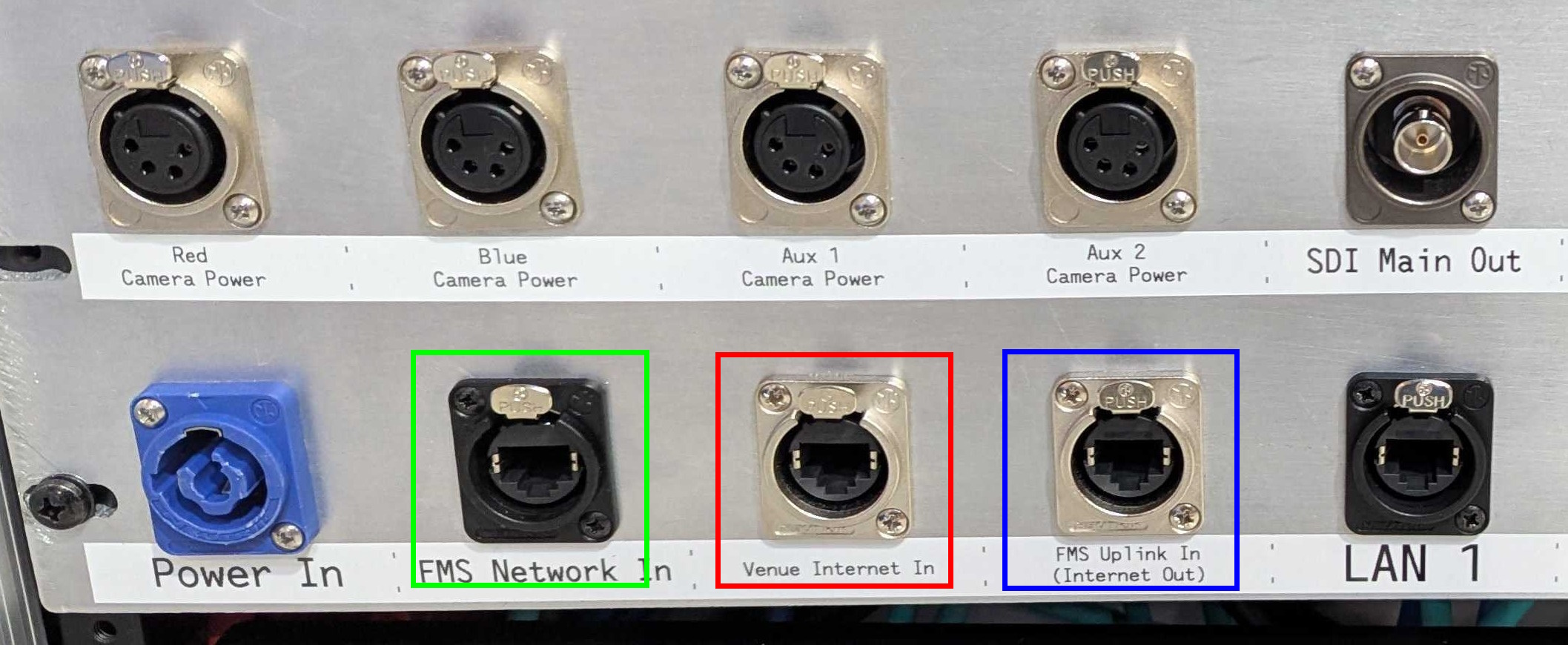
Plug venue Ethernet into “Internet In” Ethernet port on the Streaming Unit, marked in red below.
-
Retrieve two long Ethernet cables from the Ethernet AV tote. Connect one cable to the “FMS Uplink In (Internet Out)” port on the Streaming Unit (marked in blue above), and the other cable to the “FMS Network In” port.
-
Bring both long cables to the scoring table, keeping track of which cable is which. Connect the cable that was connected to the “FMS Uplink In (Internet Out)” port to the input Ethernet port on the FMS. This is located within a 4x2 keystone jack panel at the top left of the back side of the FMS case (typically facing the field). It is labeled “ETH” on the keystone jack panel and is the only jack that is populated in the panel. Consult the Equipment Manager or FTA if you need assistance finding the correct jack.
-
Connect the cable that was connected to the “FMS Network In” port to the small switch sitting on top of the FMS case. Do not connect directly to any other ports on the back of the FMS case. If the switch is not present, lay the cable on top of the case and ensure it is relatively secure from falling down. At a later point, return and connect this cable if necessary.
Stage 1b is complete. Proceed to Stage 1c.