Supplies needed: XLR cables (quantity/length varies depending on setup), speakers (if required)
- Determine what the event is going to use for sound. In preference order the options are:
A. House sound (speakers mounted in the venue)
B. House sound with Chesapeake speakers (if needed for supplemental sound coverage)
C. Chesapeake speakers. - Connect an XLR cable for the main sound output to the “XLR Main Out” XLR jack on the back of the Streaming Unit (outlined in red). This should go to the house sound if it is being used. If house sound is not being used, connect this port to one of the Chesapeake speakers.
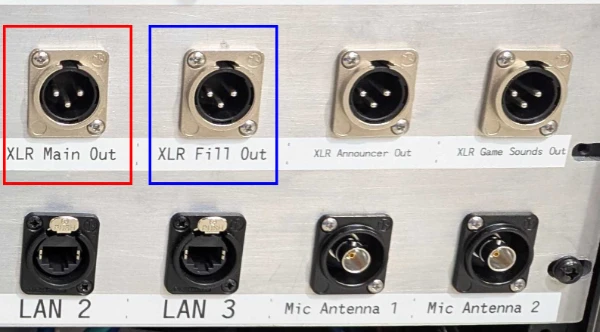
- If option C is in use, use another XLR cable to connect the second speaker to the “XLR Fill Out” port (outlined in blue). If desired, the second speaker can also be daisy-chained using the instructions below. Consult the instructions below if option B is being used, or if more than 2 Chesapeake speakers are in use.
Tap to expand/collapse instructions on utilizing two or more Chesapeake speakers with house sound.
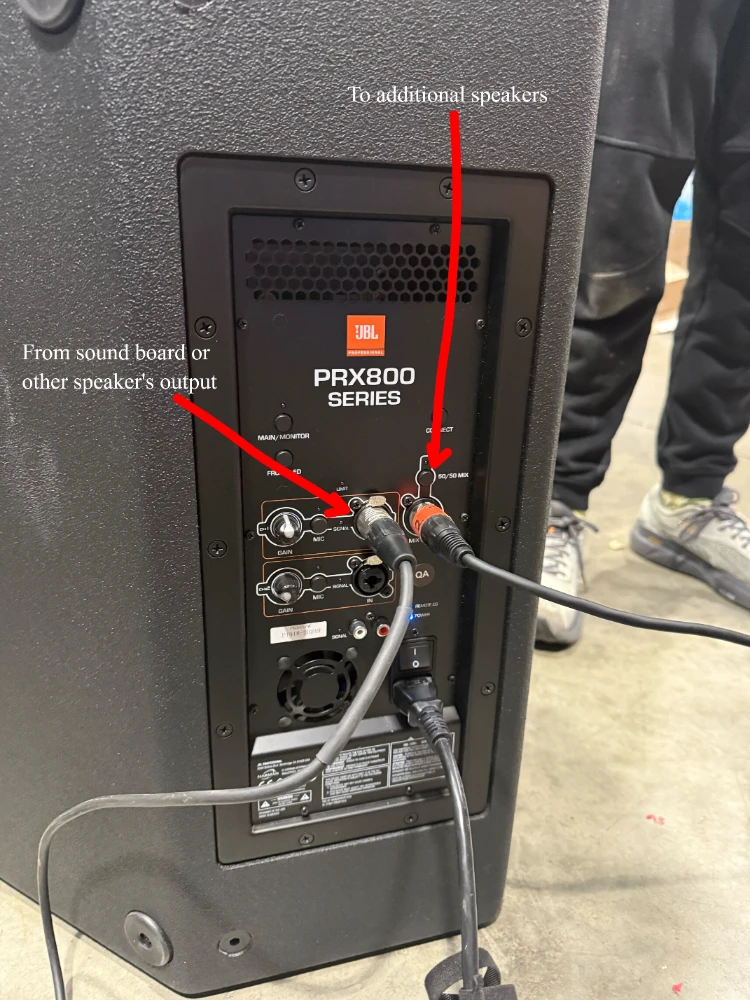
There are two XLR sound outputs available on the panel. There is a possibility that more sound outputs will need to be hooked up than output ports available. In these cases, utilize the daisy-chaining ability on the Chesapeake speakers to run all Chesapeake speakers.
Ensure the 50/50 mix LED is not lit, as this will cause your speakers to have inconsistent volumes along the line. Hold the button for a couple of seconds to turn it off.
- Utilize the specialized XLR outputs as requested by event volunteers/at the Equipment Manager’s discretion. The “Announcer Out” outputs only game sounds and commentator microphones. The “Game Sound Out” outputs only game sounds.
Stage 2e is complete. Proceed to stage 2f.